blog · works with Claude Code
Running many Claude Code agents at once: a calm setup
One agent is easy. Three is where it gets messy: two of them edit the same file, one is stuck on a question you never saw, and you've spent the afternoon tab-hopping.
Here's a setup that keeps several Claude Code agents running without your head spinning. None of it needs anything you have to buy.
one task per agent
The biggest win is boring: give each agent exactly one job, with a clear finish line. "Add the settings page" is a good task. "Improve the app" is three agents' worth of confusion.
Good split points are the ones that touch different files: the API, the UI, the tests, the docs. If two tasks need the same file, run them one after the other instead of side by side.
Write the task down before you start. A short note in the first prompt (goal, files it may touch, how you'll know it's done) saves a lot of back and forth later.
give each agent its own worktree
Two agents in the same folder will trip over each other's changes. Git worktrees fix that: each one is a separate checkout of the same repo on its own branch, sharing one history.
Claude Code can make one for you when it starts:
claude -w settings-pageThat creates a new git worktree for the session, with the name you gave it. If you use tmux, adding --tmux opens it in its own tmux session too. Or do it by hand:
git worktree add ../app-settings -b settings-page
cd ../app-settings && claude
Now each agent has its own branch and its own files. When it's done, you review and merge one branch at a time, like any other pull request. Remember to install dependencies in a fresh worktree if your project needs them.
name every session
"claude" times four is not a useful set of tab names. Start each one with a name:
claude -n settings-pageThe name shows in the prompt box, the /resume picker and the terminal title. Use the same word for the worktree, the branch and the session, and you'll always know which is which. Later, claude -r settings-page picks it back up.
background sessions, if you like
You don't need a terminal tab per agent. claude --bg starts a session in the background and prints its id. claude agents lists them, claude attach opens one in your terminal, claude logs shows recent output, and claude stop stops one while keeping its conversation. Handy when you want to start four tasks and close the laptop lid on your own attention.
agent teams
Recent Claude Code versions have an experimental agent teams feature, where a lead agent works with teammates on parts of a bigger task. It's worth a try for work that genuinely splits up. Check the docs for your version before turning it on, since experimental features change.
The same rules still apply: clear jobs, separate files, and a way to see who's doing what.
check in on a rhythm
The trap with many agents is constant checking. Every glance costs a little focus, and twenty glances an hour cost a lot.
Try a rhythm instead:
- Let a notification tell you when an agent is asking (a permission prompt or a question). Our post on knowing when Claude Code needs you shows how with
/configand a Notification hook. - For everything else, check in every 20 to 30 minutes. Answer everyone in one go, then step away.
- When an agent finishes, review its work before giving it the next task. A quick look now beats untangling it later.
keep the state visible
When you check in, you want the answer in one look: who's working, who needs you, who's idle. Tab names help. A list in your notes helps.
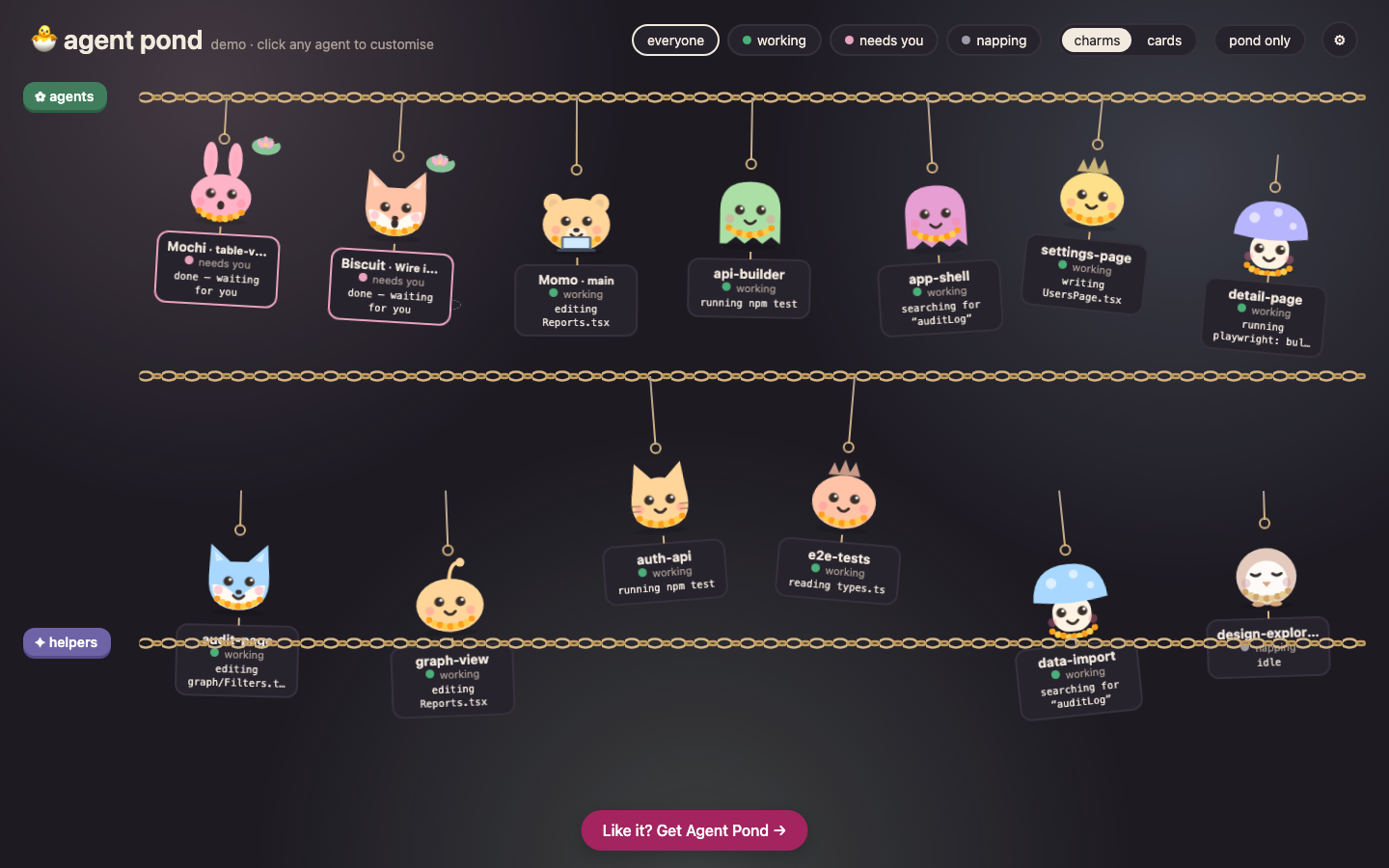
We wanted something kinder to look at, so we made Charmpond. Every Claude Code session or teammate becomes a critter in a pond. Main agents hang on one chain, and the helpers they spin up get a chain of their own, each named after its task. A working critter sways and its tag shows the exact step, like which file it's editing or which test it's running. One that needs you gets a lily pad with a slow ripple. Quiet ones nap.
It reads the session logs Claude Code already writes in ~/.claude/projects, so nothing in your workflow changes. Nothing leaves your machine.
how many agents is too many?
Start with two or three. The limit usually isn't Claude Code. It's how many pieces of work you can review well. If reviews start to feel rushed, you're running one agent too many.
And use the waiting time well. The drink-water rule is a good place to start.